Your screen protector doesn’t come with an expiry date, and it won’t send you a notification when it’s finished. Instead, it tells you quietly — a corner that won’t stay down, a roughness under your thumb, a patch of screen that suddenly ignores your taps. Learning to read those signs means you replace it when it stops protecting, not months too late or wastefully early.
This guide walks through the five signs your own protector gives you — cracks, chips, lifting corners, a worn-away coating, and touch dead spots — and explains which ones mean “change it today” and which can safely wait for the weekend.
Key Takeaways
- Any crack means change it now — a cracked protector has already spent its strength and can’t absorb a second impact properly.
- Lifting corners let dust creep underneath, and that grit can scratch the real screen the protector was meant to save.
- A worn oleophobic coating shows up as fingerprints that won’t wipe away and a draggy, squeaky feel under your thumb.
- Dead spots and ghost touches mean the protector is interfering with the screen — it has become the problem, not the protection.
- Light surface scratches with no cracks, no lifting, and perfect touch are cosmetic — that protector still has life in it.
Sign 1: Cracks — Even Small Ones
A tempered glass protector works by sacrificing itself: it absorbs the energy of a drop and cracks so your screen doesn’t have to. The trade-off is that the strength is spent. A cracked protector has no reserve left for the next impact, and the fracture lines concentrate stress in exactly the wrong places.
There’s a second, less obvious problem. Cracked glass has sharp edges at a microscopic level, and sliding your thumb across a hairline crack dozens of times a day can leave your fingertip sore or snag tiny splinters. If you can feel the crack with a fingernail, it’s time. Peel it off (tape it over first if it’s badly shattered) and fit the spare — most packs include two for precisely this moment.
Sign 2: Chips and Rough Edges
Chips usually appear at the corners and edges, where the protector meets pockets, keys, and table edges. A small chip might look harmless, but it weakens the whole pane: tempered glass distributes force across its surface, and a missing chunk creates a stress point where a future crack will start.
Run a fingertip gently around all four edges once a month. If you feel roughness, catching, or a notch you don’t remember, the protector is telling you it’s been taking hits on your behalf. One tiny chip on a corner you never touch might be worth monitoring; a chip that catches your thumb on every swipe is a change-it-now sign.
- Check your protector under a bright light at an angle — hairline cracks and edge chips that are invisible face-on show up immediately.
- Take a photo of any new damage. Comparing it a week later tells you whether a crack is stable or spreading.
Sign 3: Corners That Won’t Stay Down
When a corner starts lifting, the adhesive has given up in that spot — from age, heat, a case pushing against it, or dust that worked its way in. Press it down firmly for thirty seconds. If it pops back up within the hour, it isn’t going to reseal, and every day it stays lifted, it invites more grit underneath.
That trapped grit is the real danger. A grain of sand under a loose corner gets ground back and forth against your actual screen with every pocket ride and every press. Ironically, a lifting protector can end up causing the scratches it was fitted to prevent. A single lifting corner on an otherwise perfect protector can sometimes be a case-fit problem — try the phone without the case for a day — but if it lifts bare, replace it.
Sign 4: The Coating Has Worn Away
New protectors carry an oleophobic coating that makes fingerprints wipe away with one swipe and lets your thumb glide. After months of swiping, that coating wears thin — fastest in the patch where your thumb scrolls. The signs are unmistakable: smudges that smear instead of clearing, a rainbow sheen that won’t polish off, and a slightly squeaky, draggy feel when you scroll.
A worn coating isn’t dangerous — your screen is still protected from impacts. But it makes the phone measurably less pleasant to use, and on film protectors the worn patch can turn cloudy and obscure the display. If you find yourself cleaning the screen five times a day and it never looks clean, the protector has done its tour of duty.
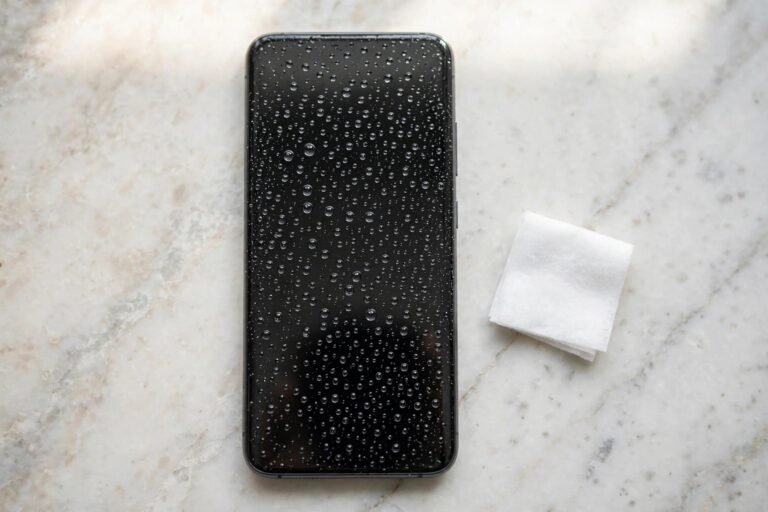
- Test the coating with a drop of water: on a healthy coating it beads up tightly; on a worn one it spreads flat. Compare the scroll zone with a corner.
- Never use alcohol wipes or harsh cleaners on your protector — they strip the coating and bring this day forward by months.
Sign 5: Touch Dead Spots and Ghost Touches
This is the sign people misdiagnose most often, blaming the phone when the culprit is the ageing sheet of glass on top of it. As a protector’s adhesive degrades or tiny cracks spread, it can create an uneven air gap. The result: a patch of screen that needs a harder press, letters that don’t register while typing, or phantom touches along a crack line.
The test is simple and free: peel the protector off (it needs replacing anyway if it’s reached this point) and use the bare screen for an hour. If the dead spot vanishes, you’ve found your answer — and saved yourself a needless repair-shop visit. A protector should be invisible to your fingertips; the moment you can feel it interfering, it’s finished.
Frequently Asked Questions
How often should I change my screen protector?
There’s no fixed schedule — go by condition, not the calendar. Many people get six months to two years from a glass protector. Change it when you spot any of the five signs above: a crack, a growing chip, a lifting corner, a worn coating, or touch problems. A protector with none of those is still doing its job, whatever its age.
Can a cracked protector damage my actual screen?
It can, indirectly. Loose cracked glass can trap grit against the screen, and a cracked protector no longer spreads impact force evenly, so the next drop lands harder on your display. The glass fragments themselves can also scratch if they shift around. It’s safer to remove a cracked protector promptly — even going bare for a day beats leaving a shattered one in place.
My protector looks fine but it’s two years old. Should I change it anyway?
If it genuinely passes every check — no cracks or chips, edges sealed, coating still slick, touch perfect — there’s no need. Age alone doesn’t expire a protector. Do run the five-sign check under a bright light, though: corner chips and early lifting are easy to miss in everyday use, and “looks fine” often doesn’t survive a closer look.
Your protector talks to you in cracks, chips, lifting corners and stubborn smudges. Check it once a month, believe what it tells you, and you’ll never be protected by a protector that quietly retired.